
Voicenotes
Coping Hard Inc.Productivity
3.9146.00 Reviews
- Version
- Varies With Device
- Installs
- 100.00K
- Age Rating
- Everyone
Screenshots


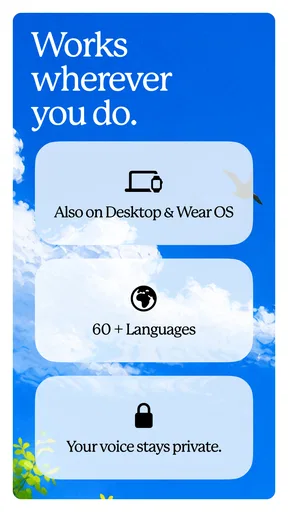
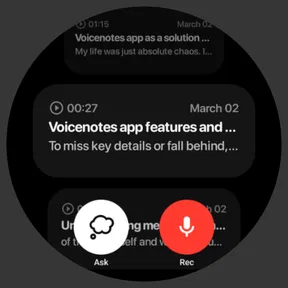
Our Review of Voicenotes
 Analysis by Appyee
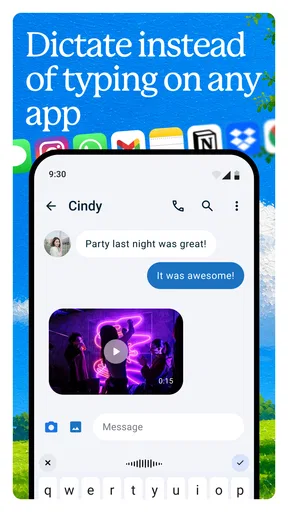
I tried Voicenotes as a productivity app for capturing thoughts, meetings, and spoken reminders, and its appeal became clear almost immediately: it reduces the distance between having an idea and saving it. Instead of stopping to type, I can speak, keep the note, and use AI to help me work through what I recorded. That sounds simple, but it changes the best use cases. This is less like a traditional notebook and more like a quick voice inbox that I can return to when my attention is available.
The app is free to start, is rated for Everyone, and comes from Coping Hard Inc. It has reached over a hundred thousand installs and holds an average rating of 3.9 from around 2.7 thousand ratings. Those figures suggest a product with a meaningful early audience, but not one I would treat as universally polished. My experience is that the idea is strong, while the value depends heavily on whether voice capture fits the way you already organize information.
Trust starts with what I can see and control
Voice recording is more personal than typing a shopping list. A spoken note can contain names, plans, work details, health thoughts, or an unfiltered reaction that I would never write down in a shared document. That makes trust a central part of judging this app, not a side issue. I pay attention to the moments where the app asks me to make a choice, what is clearly presented before I record or use an AI function, and whether I can tell which action I am taking.
Voicenotes is built around recording notes, meetings, and asking AI questions about them. I therefore think of it as a place where convenience and sensitivity meet. The most responsible way to use it is to decide in advance what belongs there. Personal brainstorming and private reminders are one thing; confidential business conversations or someone else’s personal information require much more care. I would not begin recording another person simply because the button is available. Consent and workplace rules still matter.
The app’s free entry point makes it easy to test the basic workflow without committing money immediately. That is useful because voice-first productivity is not for everyone. At the same time, the presence of in-app purchases ranging from $8.99 to $999.99 per item means I would review any purchase screen carefully before confirming anything. The wide range deserves attention, particularly for anyone sharing a device or payment method with family members.
I also appreciate that the age rating is Everyone, but I would not confuse an age label with a guarantee that every possible recording is appropriate for every situation. The content of a note depends on the person using the microphone. Parents, students, and younger users should still understand that spoken information can be sensitive and that AI-assisted processing deserves the same care as any other online service.
The core workflow is quickest when I stop treating it like a notebook
My most useful adjustment was to stop trying to make every recording perfect. I speak a rough thought, give it enough context to recognize later, and move on. A note such as “call the dentist” is easy to forget if it has no timing or reason attached. A better spoken capture is “call the dentist tomorrow morning to move the appointment.” The second version gives me something I can act on, even before AI helps me examine it.
This is one of the app’s less obvious strengths: it rewards context-rich speaking rather than polished dictation. I can include the problem, the next action, and the deadline in one breath. That makes it more practical for people who think while walking, commuting, cooking, or switching between tasks. A keyboard remains better for a carefully structured plan, but the microphone wins when opening a blank page would make me lose the thought.
For meetings, I would use a deliberate opening sentence before the discussion gets going. Saying the subject, date, and intended outcome gives the recording a useful anchor when I return to it. I would also separate personal reflections from the meeting itself rather than mixing everything into one long stream. That small habit makes later questions more meaningful because the recording has a recognizable shape instead of being an unlabelled block of audio.
The important trade-off is that recording is fast, while reviewing is still work. Voicenotes can help me preserve the moment, but it cannot remove the need to decide what matters. If I capture every passing thought without a later review routine, I simply create a more convenient pile of unfinished information. I recommend setting aside a short daily review: keep actionable notes, rewrite important ideas, and discard material that no longer deserves attention.
Where asking AI helps, and where I would stay skeptical
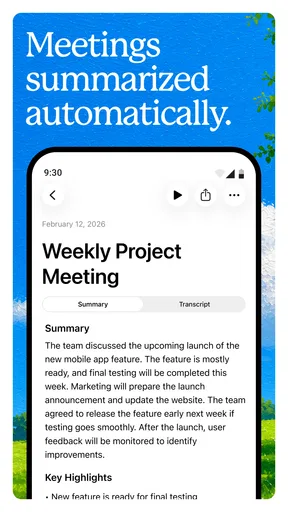
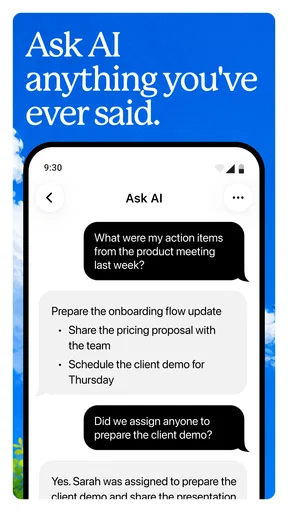
The AI element is most useful when I treat it as a search and thinking partner rather than an authority. After recording a meeting, I might ask what decisions were made, what tasks were mentioned, or which questions remain open. For a personal idea, I might ask for the main themes or a shorter recap. These prompts are better than a vague request to “summarize everything” because they give the system a job that I can check.
A practical workflow is to ask one question for facts and another for follow-up actions. The first helps me reconstruct what was said; the second turns the note into a list of things I may need to do. I would then compare the answer with the original recording before sending it to a colleague or relying on it for an important decision. Spoken conversations contain hesitations, corrections, jokes, and implied meaning, so an AI response can be useful while still missing the nuance that matters.
I would be especially cautious with names, numbers, deadlines, and commitments. Those are exactly the details that can be distorted by unclear audio or an incorrect interpretation. If a meeting affects a client, a payment, a medical appointment, or a legal obligation, I would use the AI response as a draft for checking, not as the final record. That is not a criticism unique to this app; it is the sensible boundary for any tool that turns informal speech into structured information.
Another useful technique is to ask questions from different angles. “What did I promise?” may reveal personal obligations, while “What is still undecided?” exposes gaps that a basic summary could hide. “What should I clarify?” is valuable after a complicated conversation because it turns uncertainty into a follow-up list. These prompts make the AI feature feel less like a novelty and more like a way to revisit my own thinking.
Data-sensitive moments deserve a slower decision
The easiest recordings to justify are private, low-stakes notes: an idea for a project, a reminder about errands, or a rough outline for something I am writing. The risk rises when other people are involved. A meeting recording may include confidential plans, personal opinions, or information that participants did not expect to be processed by an AI feature. I would ask permission where appropriate and follow any workplace policy before pressing record.
I would also avoid using identifiable details when they are not necessary. Instead of speaking a full name, account number, or private medical detail into a general reminder, I can often use a neutral label and add the sensitive information later in a more suitable system. This keeps the convenience of voice capture while reducing the amount of personal information placed in the note.
Before relying on the service for important material, I would inspect the visible account, privacy, and storage choices available inside the app and its platform settings. I want to know which controls are presented to me, how I can manage my account, and what options appear when I use recording or AI. I would not assume that a productivity app is automatically private, nor would I assume the opposite without reading the choices shown on my own device.
That same caution applies to shared phones and family devices. A voice note can reveal more through its title or notification than the recording itself. I would use a neutral title for sensitive topics, check who can access the device, and avoid leaving private recordings in a place where another person can casually open them. These are ordinary precautions, but they matter more for audio because a single tap can expose a long conversation.
How it compares with typing, built-in recorders, and task apps
Compared with a standard notes app, Voicenotes is faster at the capture stage and more natural when my hands are busy. A typed note usually gives me cleaner structure from the beginning, which is better for reference material, detailed checklists, and information I expect to edit repeatedly. I would choose typing when accuracy and formatting matter more than speed.
A basic voice recorder can be a better choice when I only need an audio file and do not want an AI-centered workflow. It is straightforward for preserving a performance, an interview, or a long conversation for manual listening. Voicenotes becomes more attractive when I want to ask questions about what I said or use spoken material as the starting point for organized thinking. The difference is not simply recording quality; it is what I plan to do after recording.
Task managers remain stronger for deadlines, recurring responsibilities, priorities, and team coordination. I would not replace a dependable task list with a collection of voice notes. Instead, I would use Voicenotes at the messy beginning of a task: capture the idea, explain the desired result, ask AI to identify actions, and then move the final commitments into the system I already trust. That division of labor keeps the app useful without asking it to become an entire productivity platform.
It also differs from a conventional meeting transcription service in the way I approach it. I see it as a personal capture tool first, not a reason to record every conversation automatically. If my main need is formal transcripts, speaker identification, or a team archive, I would compare dedicated services more closely. If my need is remembering my own thoughts and interrogating my own recordings later, this app’s simpler voice-first idea makes more sense.
A realistic day with the app
Imagine I am leaving a meeting with three loose impressions: a customer wants a revised proposal, my colleague needs a technical answer, and I promised to check a delivery date. I can record those thoughts immediately instead of trusting memory. Later, I ask AI to separate decisions from follow-up work, listen back to the original note, and transfer the confirmed tasks into my normal task manager.
The benefit is not that the app magically completes the work. The benefit is that it preserves the transition between conversation and action. Without quick capture, I might remember only the most urgent item and lose the smaller commitment. With an unreviewed recording, I might preserve everything but act on nothing. The useful workflow sits between those extremes: speak freely, question selectively, verify important details, and finish by choosing where each item belongs.
For personal planning, I could use the same pattern at the end of the day. I would describe what went well, what remains unresolved, and what I want to remember in the morning. Asking for recurring themes could help me notice that several unrelated notes point to the same problem. I would still make the final judgment myself, but the ability to revisit a week of spoken thinking can reveal patterns that isolated typed reminders often hide.
Who will enjoy it, and who should skip it
I recommend Voicenotes to people who regularly lose ideas because typing feels too slow, professionals who need a quick personal meeting recap, and anyone willing to build a review habit around captured audio. It is particularly suitable for users who think aloud and want AI to help turn unstructured speech into questions, summaries, or next steps.
I would be more hesitant to recommend it to someone who wants a strict task-management system, a highly formatted knowledge base, or a simple recorder with no extra layer. It may also be the wrong fit for anyone uncomfortable with cloud-based voice workflows or unwilling to check privacy and account controls before storing sensitive information. In those cases, a local-first note system, a conventional task manager, or a basic recorder may be a better match.
The purchase model is another reason to move carefully. Since the app is free but offers in-app purchases with a very broad per-item range, I would test the free experience first and read each payment screen rather than assuming every capability is included. I would also protect purchases with the device’s normal confirmation settings. The app can be worth exploring without making an immediate financial commitment, and that is the approach I would take.
My cautious verdict after using it
Voicenotes has a clear and useful idea: let me capture thoughts in the form that is quickest at the moment, then give me a way to question those recordings later. Its strongest advantage is not recording alone. It is the bridge from spontaneous speech to reviewable information, especially when I use specific prompts and verify details before acting on the result.
Its limitations are equally important. Voice capture can become clutter, AI can misunderstand context, and sensitive conversations require permission and careful judgment. The app will not replace a task manager, a formal document system, or a privacy review. I also would not judge its value by the store summary alone; the real test is whether I can maintain a reliable habit of reviewing what I record.
With that caveat, I think it is worth trying for free if your main problem is losing ideas before you can type them. Start with harmless personal notes, learn how the visible controls and account choices work, and create a simple review routine before recording anything sensitive. My recommendation is conditional but positive: use Voicenotes as a fast capture layer, not as an unquestioned home for every private conversation or every important task.
Coping Hard Inc. has made a productivity app that feels most convincing in the in-between moments: after a meeting, during a walk, or whenever a thought arrives too quickly for a keyboard. I would keep my expectations realistic, protect sensitive information, and let a trusted task or notes system handle the final organization. Used that way, it can earn a useful place in my daily workflow without pretending to solve productivity by itself.
Verdict
Strengths of Voicenotes
- Quick voice capture makes it easy to save ideas while multitasking.
- Automatic transcription turns recordings into searchable written notes.
- AI summaries help condense long recordings into useful takeaways.
- Organized notes make revisiting personal thoughts and reminders convenient.
- Useful for meetings, lectures, interviews, and everyday memory aids.
Limitations of Voicenotes
- Transcription accuracy can drop with background noise or strong accents.
- Some advanced AI features may require a paid subscription.
- Cloud-based processing may concern users with sensitive recordings.
- Long recordings can take time to upload and process.
- The app’s usefulness depends on a stable internet connection.
Similar Picks in This Category
View All
Google Calendar
Google LLC4.6

Google Drive
Google LLC4.3

Google Assistant
Google LLC3.9

Microsoft OneDrive
Microsoft Corporation4.6

Samsung Calendar
Samsung Electronics Co., Ltd.4.1

Microsoft OneNote: Save Notes
Microsoft Corporation4.6
Frequently Asked Questions
What is Voicenotes and what can I use it for?
Voicenotes is a voice-recording and note-taking app designed to help you capture ideas, reminders, meetings, personal reflections, and other spoken information quickly. After recording, you can generally organize, review, and search your notes more easily than with ordinary audio files. It is especially useful when typing is inconvenient, although the exact tools and available features may depend on the version of the app and your subscription plan.
Does Voicenotes automatically transcribe voice recordings?
Voicenotes is primarily intended to turn spoken thoughts into useful notes, and transcription or voice-to-text functionality may be available depending on the platform and current app version. Before downloading, check whether your preferred language is supported and whether transcription requires an internet connection, an account, or a paid plan. Accuracy can also vary with background noise, accents, speaking speed, and recording quality.
Is Voicenotes free to download and use?
The app may be available as a free download, but some advanced capabilities can be restricted by usage limits, subscriptions, or in-app purchases. These limitations may apply to transcription volume, storage, artificial-intelligence tools, exports, or synchronization. We recommend reviewing the current pricing information in the Google Play Store or Apple App Store before relying on Voicenotes for frequent or professional use.
Can I access my Voicenotes recordings on multiple devices?
Multi-device access depends on whether Voicenotes supports account-based synchronization for your version and whether you sign in with the same account on each device. If synchronization is offered, it can make notes available across Android, iPhone, or web-supported platforms, but offline behavior and transfer times may vary. Check the app’s backup, export, and sync settings before replacing your phone.
Are my recordings and transcriptions private in Voicenotes?
Because voice recordings and transcriptions can contain personal, financial, or confidential information, privacy should be checked carefully before use. Review Voicenotes’ privacy policy to understand how audio is stored, whether recordings are processed on remote servers, how long data is retained, and whether information is shared with service providers. Avoid recording other people without their knowledge or permission, and use available security controls.
